


Update Feb. 13, 2024
Instagram has informed users that, as of January 12, 2024, the group profiles feature has been removed from the platform.
However, it will be possible to download all posts published on (former) group profiles from the Accounts Center until April 11, 2024 or view them from the post archive.
You’ve heard about Instagram’s “group profiles” but you don’t know which way to turn? That’s why we are here!
In this article you can find all the information you’re searching for (and even some extra tip!)
In these years, the deeper knowledge on social media and further studies on communication strategies have made it clear that the right path to keep growing on these platforms, especially on Instagram, is to create a strong and engaged community. And it is mostly Meta that is putting efforts towards the needs of brands and creators, keeping on testing and coming up with new features that – as announced on their blog – “offer people a new way to collaborate and connect with each other”.
In its blog, Meta writes that “people often create group chats on Instagram to share entertaining content, bond over memories, and make plans with friends.” Could it have been this way of using the platform by people that gave Instagram the cue to create group profiles?
What are group profiles
Announced in December 2022, group profiles are inspired by Facebook’s groups, which were widely used at the time when Meta’s platform still was the flagship social network among users.
Group profiles, also called “communities”, are basically actual profiles that can be managed by multiple people through their own account, without the need to share a username and password to switch between profiles each time. Any user who is part of the community can contribute to the feed by sharing posts, stories and other contents that will not be shown in his personal profile but only in the group’s dedicated space.
Group profiles can be public or private:
- The public profile will be visible to anyone on the platform, as will the content shared within it. Membership in the community will be free of any approvals by group admin.
- The private profile, on the other hand, will only allow its members (accepted by admins or invited by them to join the community) to share new content which, just as with personal private profiles, will not be visible to non-members.
In any case, administrators can decide whether approval of new content will be mandatory before users publish it.
EXTRA TIP: a public profile can be made private in every moment, but not vice versa. If a group profile starts out as a private group, it can never become public.
How to create a group profile
Creating a group profile is super easy: from your own profile just tap on ‘+’ in the top right corner (as if to post new content) and select “group profiles”.
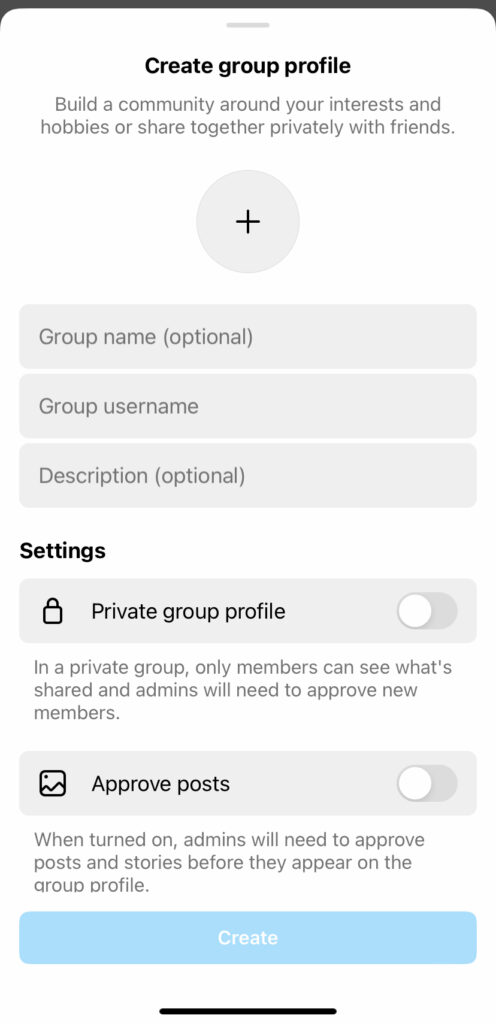
From the dropdown menu you will be able to choose a profile picture for the community, enter the group name and a description, and set the visibility (public/private) and post approval settings. Once you have entered all the information, tap on the “Create” button and choose the people to invite into your community.
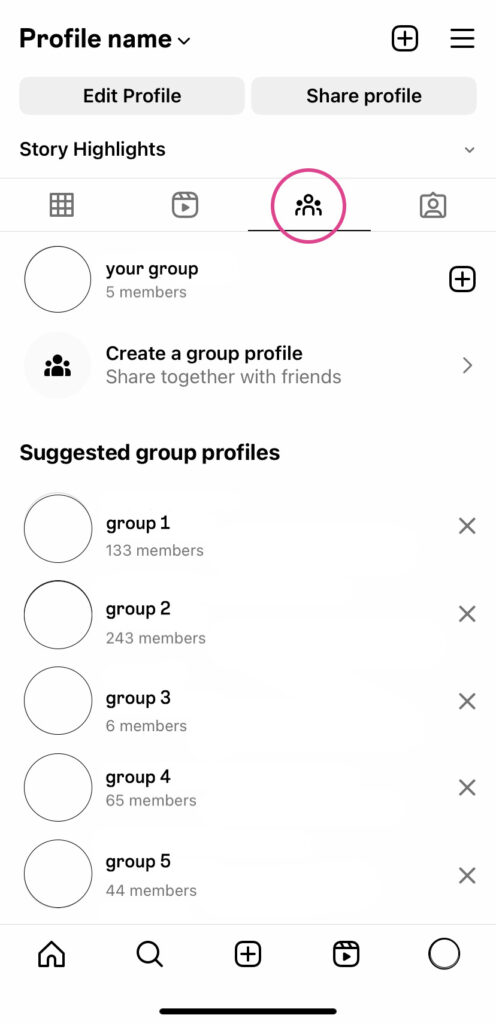
Obviously, you can be a member and/or an administrator of multiple group profiles; to view all the communities you belong to, simply select the third icon in your personal profile, the one between the reel icon and the tagged post icon.
Furthermore, all followed group profiles will be displayed in the list of followers on your personal profile.
How to add members
As an administrator, you will be able to invite new users to join the community. Just enter the group profile by selecting it from the burger menu and tap on the “Invite” button right below the group description. At this point, you can search and select the users you want to invite, who will then receive a DM (direct message) with an invitation to join the group.
EXTRA NOTE: group profiles have a limit of 5.000 members and 20 administrators.
How to join a group profile
To join a community, you can search the group name in the search bar of the Explore section and tap on the “Join” button. As anticipated, if the group profile is public you can freely join, while if it’s private you will have to wait the approval from one of the administrators. You can also join a group profile by accepting the invitation that you will receive in DM from an admin.
How to post a group profile
To post on a group profile the procedure is the same as when you post on your own profile: by tapping on ‘+’ you will be able to choose what kind of content you want to share, edit photos and text, tag other users and add a location. Additionally, you will see the new “Post to” section, where you can flag the profile on which you want to post your content.
The post will then be visible – subject to admin approval – in the group profile, with a headline that will show the name of the group followed by the name of the user who shared it.
How to delete a group profile
Nothing easier! On the group profile page, by tapping on the “Admin” button (note, only administrator can delete the group), a dropdown menu will appear with some items. The last one, marked in red, is “Delete group profile”.
In short, this new feature highlights a trend within Instagram, and more generally for the entire Meta group, to give more space to vertical communities and to establish itself as a place where to connect with friends or with unknown people who share the same passions and hobbies: “Whether it’s catching up with friends or exploring shared interests, connecting with others is why people come to Instagram.” (Source)
Using group profiles in communication
Having considered this, can brands and creators take advantage of this new feature? Absolutely!
Creating a group profile means approaching a community composed of users who are genuinely interested in the services or activities being communicated.
In geeky terms, an engaged fanbase who interacts with the content, because sincerely interested, improves engagement and helps the brand/creator grow and achieve significant conversions.
For the brand, this could mean having a space to share exclusive content such as “behind-the-scenes” or dedicated discount offers, or perhaps a space to better understand what other aspects of the brands followers might be interested in, using then this information to create high-engagement posts on the official profiles of the brand.
Moreover, in the specific case of group profile, followers can share what they think and feel in a direct way, nurturing a sense of belonging to the brand/creators’ community, which will inevitably lead them to be its first spokespeople – the best ones!
So…now you know all the secrets about Instagram’s new group profiles.
Curious to find out more about the world of social media and digital marketing and needing to always keep your eyes on the ball? Sign up for our newsletter to be updated on all the latest news. At least, this way you cannot run out of topics at dinner parties😉
Sources:
https://about.fb.com/news/2022/12/sharing-features-on-instagram-notes-group-profiles-and-more/
https://later.com/blog/instagram-group-profile/
https://later.com/blog/instagram-group-profile/


Leave a Reply