

Back at the times of the first advertising agencies, tracking down how many people had been “hit” by a specific ad campaign was almost impossible. There was no tool reliable and precise enough to determine how many women had seen the ad of the latest shoe model or how many men had bought the season ticket of their favorite team thanks to the related advertising.
A lot has changed ever since and today advertisers, especially with the beginning of the digital era and the evolution of MarTech, have access to a great deal of monitoring data for each ad campaign.
Since digital advertising has grown enormously in the last years, the amount of collected data through digital interactions is constantly increasing too.
The introduction of tracking, in fact, allowed marketers to more accurately (and, as a consequence, in a more focused way) measure and test the effectiveness of online advertisements and ad campaigns based on users’ behaviour.
In this article we will go through the following topics:
- What is Tracking
- What are Cookies
- What are UTMs and How They Work
- What are tracking pixels
- Google, Facebook, Instagram and LinkedIn Trackings
What is Ad Tracking?
Ad tracking is the process of collecting data regarding online ad campaigns’ performances, useful for further deepening users’ behaviour and for improving their online experience.
Ad performance is a type of tracking that does not depend exclusively on cookies, tags or pixels (which we will tackle on later): in fact, it is measured by different analytics platforms (Google Ads, Business Manager and Google Analytics – even if in a broader way -, above all) and it includes a series of useful metrics such as Views, Clicks, Impressions, Cost per Click, Cost per Result, Cost per Thousand Impressions, Cost per Acquisition, Conversions, and many more.
In order to link analytics and advertising, we can take advantage of some methods that integrate the two platforms and allow them to interact, as well as exchange information and data. Such pieces of information are collected through the use of cookies, monitoring URL and monitoring tags/pixels.
Precisely because metrics and data to be tracked are potentially infinite, and there are a lot of tracking methods, it is a good practice to determine at an early stage what will be worth tracking for an advertisement or ad campaign.

Cookies
A cookie is a small piece of data stored on the user’s computer by the browser while surfing on a website.
Cookies, designed to be a mechanism as reliable as possible for websites, were created to remember status information (such as items added to cart in online shops) or to register the user’s browsing activity (including clicks on specific buttons, accessing or registering pages visited in the past). They can also be used to remember pieces of information that the user has previously filled a form with, such as names, addresses, passwords and credit card numbers.
Especially with the introduction of the new privacy regulation (the obligation for websites to request permission to users to use cookies was set in May, 2011), you have surely noticed (if you reside in the EU) that any website you visit is requesting the permission to use cookies.
In fact, they can help marketers analyzing and understanding users’ behaviour on a website.
In order to use them, to track users’ activity and improve their experience with customization, it is necessary to obtain users’ explicit consent to use cookies (what you see anytime you enter a website for the first time).
When it comes to ad tracking, cookies play the most important role in retargeting campaigns.
They can be used to build a user profile based on the activity and habits of the user itself: once such information is obtained, advertisers will be able to use such profile to create ads as suitable as possible to the user’s interests.
There are mainly two types of cookies: first party and third party cookies.
Let us try to understand the difference between the two.
The distinction between first and third party cookies lies on a subjective criterion: basically, it depends on who will actually manage the collected data.
First party cookies, as the name suggests, are placed on your device by the website you are visiting.
While third party cookies are placed on your device not by the website you are visiting, but by a third party such as advertisers or analytics systems (source: https://gdpr.eu/cookies/)
Ultimately, it is useful to take into consideration the different subject that places cookies on the user’s device, whether it is the one managing the website that the user is visiting or a third party website that places cookies thanks to the first one.
So, in order to better understand how cookies work, here are some examples:
- As a user or consumer, when you are browsing The New York Times website, you agree to the use of placed cookies, which are first party, since they are owned by the NYT (through them it can monitor the content performance);
- As a publisher or marketer, if you are using Google Analytics or Business Manager, you are placing third party cookies on the websites that will host your advertisements;
- As a publisher or marketer, if you are using an proprietary software, placed on the server that you directly control, you are placing first party cookies to the sites loaded by the user.
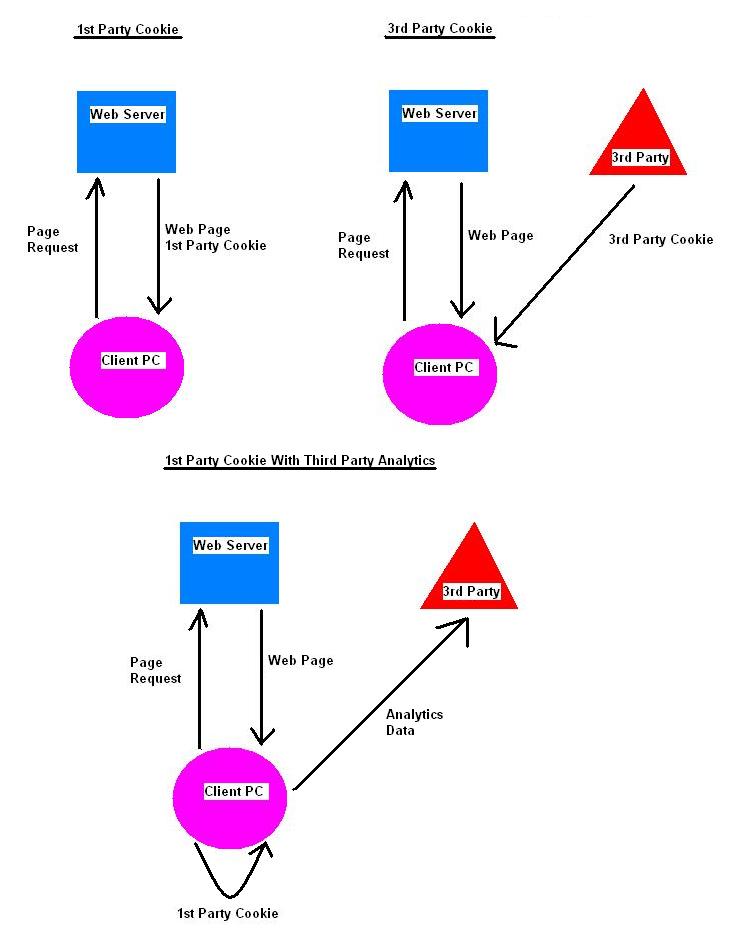
Source: http://www.bugdaddy.com/geekybug/first-party-cookie-confusion/
URL Tracking with UTM parameters
The acronym UTM stands for Urchin Traffic Monitor and it indicates the data analysis tool bought by Google to create Analytics (source: https://support.google.com/urchin/answer/28710?hl=en).
UTM code is a piece of simple code that can be added at the end of a URL (website address). Metrics tracked by UTM codes will appear in your analytics reports and will be very useful to get more precise insights of marketing performances.
UTMs are parameters that help tracking every URL performance, identifying where traffic comes from or conversions’ results.
Just as an example, suppose that you want to track the traffic coming from your Instagram Stories: you can do that by reading the analytics of UTMs included in each link you post in each Story.
Here’s an URL of the landing page and the same URL containing UTM parameters:
- https: //miosito.com
- https:// miosito.com?utm_source=instagram&utm_medium=conversion&utm_campaign=story1
As you can see in the second case, the URL string is much longer and it incorporates a set of tracking tokens (in this example formed by three elements), also called UTM parameter. Note, that while the URLs seem different, they will both lead you to the same page.
This is how the code works: when a user clicks on a URL containing a UTM parameter, the UTM sends a signal to your ad tracking tool, which will inform you that the link has been actually clicked, showing the additional information you provided while creating the link.
Always referring to the example above, the full writing of the UTM you used will be as follows:
Source = instagram (the originating channel of advertising)
Medium = conversion (the purpose set by the publisher of the advertisement)
Campaign = story1 (the name given to the advertisement by the publisher).
In this specific case, in the analytics platform, the marketer will easily recognize the advertisement called “story1”, channeled through Instagram, with a ‘conversion’ goal.
In case it would be necessary to monitor other parameters, more of them could be added according to needs and requirements.
On the different ad platforms (Business Manager, LinkedIn, Twitter), you can add UTMs once you have created your advertisement.
If you would like to replicate this example and create a customized UTM parameter to track data from an Instagram Story on Google Analytics, click here and create your own UTM.

Tracking Pixels
A tracking pixel is a piece of code released by some systems, with the purpose of being implemented on websites, advertisements or even emails, in order to track different types of data. Every time it gets uploaded, it will send a signal to your tracking tool, indicating that a user has actually displayed the related web page, advertisement or email.
The power of tracking pixel lies on their capability of collecting even complete data about the user’s activity and the browser configuration.
Properly used, tracking pixels prove very useful for ad optimization, because they can provide an overview of users’ interaction with advertisements and, furthermore, with third party websites to which the advertisements themselves pointed to. All these pieces of information are useful when it comes to optimizing every step of the user’s activity.
Google Tracking
Google offers different options of ad tracking when creating a campaign on the platform – the majority of which are based on cookies.
Properly structured cookies do not contain any identifiable personal information. Depending on both publisher and user’s settings, information associated with cookies used in advertising may be added to the user’s Google account (source: https://support.google.com/campaignmanager/answer/2839090?hl=it).
Google Analytics, Google Ads and Google Tag Manager are some of the most powerful and worldwide used tracking tools: they can be connected and integrated, to exchange information and allow marketers to analyze every metric in detail.
Let us now try to define each of them, shortly sum up what they do and what they offer:
Google Analytics
The market leader in analytics tools, also known as GA, is largely considered to be a source of truth as to websites’ traffic and conversion data.
Google Analytics enables to monitor plenty of metrics (users, unique users, views, pages per view, time spent on the page, etc.), as well as track the user’s path and the related acquisition, giving back rich data about channels, devices, and information on how the user came across the website (e.g., organic search, referral, paid traffic, etc.).
Getting back to ad tracking, two interesting sections of Google Analytics are “Acquisition” and “Behaviour”, in which it is possible to analyze in details how users entered your website (e.g., through which device and operating system, from which city, and so on) and how they interacted with it (i.e. how their navigation paths and which content they perused).
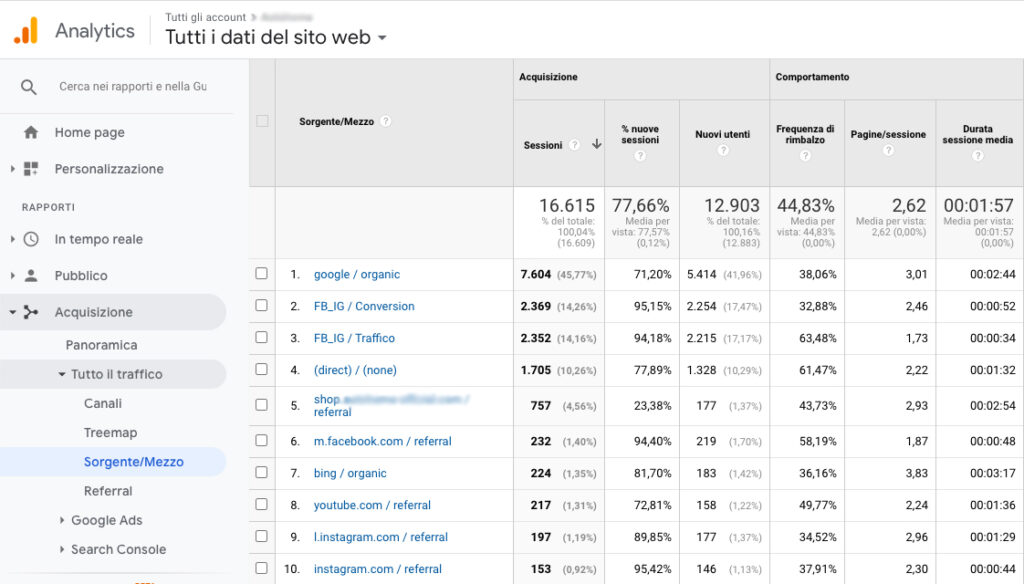
On the topic of tracking through customized URLs, Google Analytics also offers the possibility of tracking and analyzing the traffic brought to the website thanks to UTM links. To see the related reports, visit the section “Acquisition > Traffic > Source/Medium” (e.g., in the picture below, “FB/IG Conversions” is an ad campaign launched on Facebook and Instagram, with a conversion goal).
Google Ads
The platform offers the possibility to create paid advertisements that will appear among the results of the Google search engine and on other websites, through the Display Network.
The “sponsored” search results will show a label indicating their nature as ‘paid advertising’.
Besides these ads, Google also offers advertisements to be displayed on the Display Network: a wide range of websites that agreed to display Google advertisements (in text, image, video or banner format) in exchange for an economic arrangement of revenue sharing.
Google Ads also offers several cues for analyzing ad data: after creating your advertisements, in fact, you can proceed in further analysis in the report sections. You will be able to build detailed reports, with several options to satisfy almost any need.
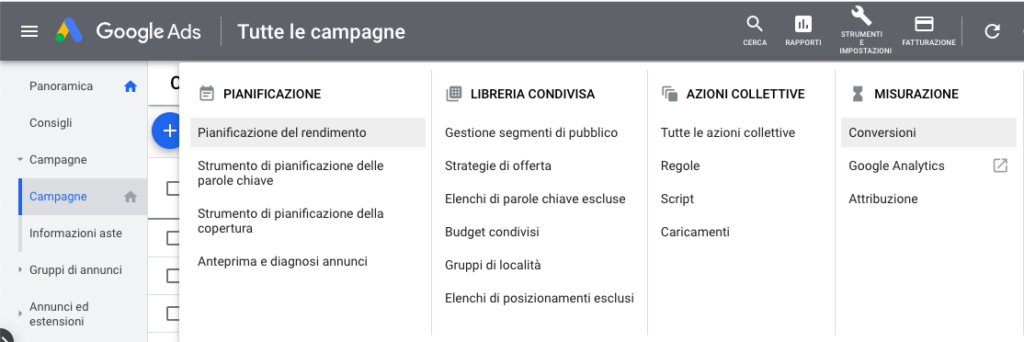
Moreover, Google Ads enables an even more detailed tracking level, perhaps the most sophisticated, in the section “Measurements > Conversions”, in which specific goals can be set, to be subsequently monitored on the landing pages of ad campaigns. Such goals (i.e. “conversions”) will be monitored almost real-time by the platform, and always be associated with the ad campaigns which generated them.
Google Tag Manager
Free Google tool, created on the 1st of October 2012, Google Tag Manager is a monitoring and tracking platform through which you can place, manage and update pieces of code, called tags, on the HTML pages of a website or on iOS and Android apps.
Its strength lies in the possibility, for anyone, to add tracking tags without having to manually place them in HTML codes. As a consequence, it can be used even by people who do not have professional programming skills.
Google Tag Manager is an extremely powerful and sophisticated platform: through a preliminary planning and a subsequent designing you can create triggers (or events) able to track almost any user’s action on a website.
A necessary clarification: when we say tags and pixels, we are basically talking about the same thing. The difference, in fact, lies only in the naming but, as a matter of fact, they both track codes aiming to tracking online activities.
Here you can check which tags are supported by Google Tag Manager (https://support.google.com/tagmanager/answer/6106924?hl=it), which means the tags that can be set on the inside of the platform – since they are already integrated – without having to create them from scratch or resorting to custom HTML.
Facebook and Instagram Tracking
Publishers on Facebook – and on Instagram as well – can exploit different tracking strategies to optimize advertising for their audience.
Every time an action takes place on a specific page or website on which a tracking pixel was placed, it will send the related information to your Business Manager account.
Along with monitoring the user’s intentions and actions on a website, one of the most interesting possibilities offered by the Facebook Pixel is that the collected pieces of information can be used to create a custom audience (i.e. even more targeted) for next ad campaigns.
As we said above, Business Manager also shows the feature for creating UTM parameters which, through the integration with Google Analytics, allows the tracking of source, medium and campaign for every advertisement.
LinkedIn Tracking
Could we leave the professional social network behind? Of course not! In this case we talk about the LinkedIn Insight Tag.
As LinkedIn itself defines it, the Insight Tag is a piece of code that can be added to a website to ease the detailed reporting of ad campaigns and obtain valuable information about visitors of the website itself.
LinkedIn Tag, which is part of the ones supported by and integrated in Google Tag Manager (as we said above), enables the connection of a website conversion goals (e.g., lead generation, newsletter subscription, download of documents, etc.) to LinkedIn ad analytics tools.
As it occurs with Google, Facebook and Instagram, the implementation of such conversion monitoring functions proves to be useful for obtaining more precise data which the optimization of the ad budget on LinkedIn Ads can be based on.
Monitoring Codes, the Best Allies for Marketers
The first use of cookies dates back to 1994, when they were first used to check if the readers of the website Netscape (the first successful graphic web browser in the history of technology) had already visited it before. Ever since, a lot has been accomplished, until the creation of increasingly more sophisticated, precise and performing systems, allowing to track unimaginable information, as well as allowing MarTech to take giant leaps forward.
Tracking codes are of vital importance for those who manage web projects: without them, in fact, web analytics services could not be used and, as a consequence, working on marketing campaigns’ optimization would be much harder.
Why are they useful? Easy: to provide the “owner” of a campaign with greater control over the campaign performance (be it a campaign through Google, Facebook, Instagram, LinkedIn or else), and to enable optimization automatisms determined by such performances.
For example, without the activation of conversion tracking codes, Google Ads could not suggest which keyword is performing better, which campaign is obtaining more results and, most of all, which costs to optimize in order to get better performances.
To sum up, the world of tracking is truly vast and cannot be summarized in a few pages. However, we hope to have piqued your interest on this topic and aroused some curiosity for learning more about it.
If you feel like it, please ask us more about tracking, and we will be glad to answer your questions and have a talk with you.
And if you would like to receive Exa Futures’ newsletter (not more than twice a month, it’s a promise!), click here to subscribe.