

The Coronavirus pandemic marked a huge leap forward for Big Tech companies: among these, surely, Amazon was the one that made more talk about itself thanks to the global boom of e-commerce (but also thanks to the increase in Digital Advertising and the growth of the division dedicated to cloud services), bringing its market capitalization to nearly 1,800 billion dollars (in third place, after Apple and Microsoft).
Source: https://www.forbes.com/sites/jonathanponciano/2021/04/29/amazon-earnings-first-quarter/
With this firepower, due to the hundreds of millions of Amazon’s users, there is no doubt that even the platform created by Jeff Bezos must be at least considered in an integrated Digital Advertising Strategy.
In fact, for certain products and brands, Digital Advertising on Amazon could be a great opportunity to reach new customers and increase their business.
In terms of comparison, while Google owns people’s search data and Facebook knows their interests, Amazon knows directly what and how users buy on their platform. And on Amazon, you know, there is everything.
In this blogpost, we will see how the Amazon Advertising platform works, what are the Amazon Ads, what differences there are with Google Ads and Facebook Ads, how many and what types of advertisements you can use, how they work advertising auctions, how much they cost, how to create a campaign.
Amazon Advertising: how it works
The advertising section of Amazon was founded in 2012, with the name of Amazon Marketing Services, and offers the possibility to create ad hoc sponsored ads to quickly reach the largest number of buyers.
In order to use the service, you must have one of these 3 accounts:
- Vendor Central account: the classic Amazon supplier account;
- Advantage Central account: a type of account used primarily to sell publishing and multimedia products;
- Vendor Express Account: a method through which products are sold and shipped by Amazon (so the seller only collects on the products actually sold).
We anticipate from now (we will see it better later) that the operation of Amazon Advertising is very similar to advertising on Google: as in Google Ads, the model used is at auction.
The target of the ads can be defined through the criterion of keywords and similar or related products to those that are intended to be promoted.
Currently, the countries in which you can use the advertising platform of Amazon are: Germany, Spain, France, Italy, Netherlands, United Kingdom, Canada, Mexico, United States, Brazil, Saudi Arabia, United Arab Emirates, Australia, India, Japan, Singapore.
In each of these there are different advertising solutions; for example, while in the United States it is possible to use, in addition to the three main types of ads (sponsored brands, sponsored display, sponsored products), also audio ads (on Amazon Music), in other countries this one is not yet available.
Or, again, compared to European countries, only in the United States is active Amazon Live, which helps advertisers to improve the consideration of their products by informing and interacting with customers via video shoppable live streaming.
What are Amazon Ads?
Similar to how Google search works, when you type a keyword in the Amazon search box and results appear, some of the best results will be the sponsored posts – these are considered Amazon ads. They are indicated with subtle “sponsored” or “ad” text as in the image below.
Advertisers who want to give more visibility to their products on Amazon can pay for these positions by making offers on specific keywords, just as it works for Google search: in this case, the advertiser will pay each time a customer clicks on its ad.
Amazon ads may also appear on individual product pages. For example, when you look at a certain product you can view an advertisement for sunglasses on the right side of the page.
However, in addition to this, there are different types of Amazon ad options that we will see together later.
Amazon Advertising: differences and similarities with Google Ads and Facebook Ads
Just like Google Ads, Amazon Advertising works by entering keywords according to which users will find your ads.
Keywords can be either positive or negative. Negative keywords are those keywords for which we do not want users to find our ads.
For example: if you want to sell a book for adults, among the negative keywords it is advisable to insert the term “children”, so as to exclude this audience.
As anticipated, just like Google Ads, Amazon Advertising works with an auction system, so those who invest more in the campaign will also have better visibility.
However, unlike Google Ads, Amazon Advertising uses a Second-Price Auction system: if we have three advertisements for the same keyword, the highest bidder only pays €0.01 more than the second-highest bidder.
Let’s take a practical example: for the keyword “coffee book”, there are three sellers with the following offers:
- Seller A –> offer max: 1€;
- Seller B -> offer max: 0.50€;
- Seller C -> offer max.: 0.25€.
Instead of actually paying €1, seller A (who won the auction) will pay €0.51 for the keyword “coffee book”: a good way to try to increase sales while keeping advertising costs low.
Another difference with Google Ads is not being able to define the demographic details of the target: Amazon Advertising, in fact, only allows you to establish the platform on which to publish the ad (Amazon.de, Amazon.it, Amazon.us, Amazon.fr, etc.), keywords for which the advertisement should appear and their correspondence (which is the margins of error in the writing of keywords).
Compared to Facebook Ads, however, the differences are total: among these, for example, since you can’t define the demographic details of the target, it is not even possible to use similar audiences (those in Business Manager are called “lookalike”).
How many and what types of advertisements are there in Amazon Advertising?
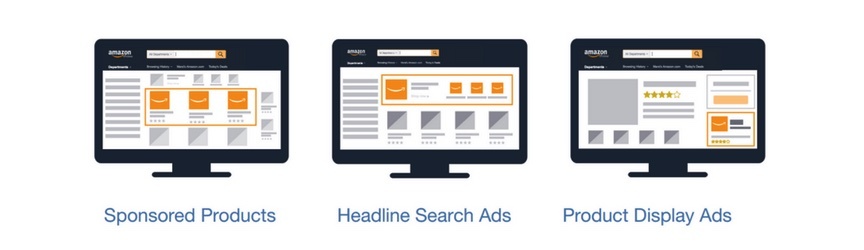
Amazon allows the following three types of ads:
- Sponsored Products
- Sponsored Brands
- Product Display
Sponsored Products
These ads operate in a similar way to ads posted on the Google Shopping Network: they are ads that guide Amazon users directly to a specific product that you are selling on Amazon.
When a user clicks on the sponsored products ad, it will be directed to the sponsored product detail page.
This type of ad is typically displayed above or below the search results page, as well as on other product detail pages.
As already mentioned, ads are targeted by keywords and advertisers have the option to choose between exact, phrase or broad match types. Just like other advertising platforms, advertisers also have the control to set a daily budget, an overall budget for a campaign and its end date.
Sponsored Brands
These ads are displayed in search results pages as headline banners always above the list of results.
Also in this case, they work in Pay Per Click mode and direct users who click on any page on Amazon: generally, the landing page is the main one of the specific brand.
These ads can also be used to promote 3 or more products together; they only support two types of matching, “exact” or “phrase”.
Finally, the minimum budget for a sponsored brands campaign is $100 and can be programmed up to four months in advance of the launch.
Product Display
Finally, the third type of ads concerns the display of the product and works in a slightly different way than the first two.
These ads are not targeted by keywords, but rather by targeted interests or products.
Advertisers can choose from a long list of products (e.g., products similar to the one being sold) or interests (e.g., whether the potential customer is interested in listening to music or playing a musical instrument) to address these ads to relevant buyers.
Product displays may appear at the right or bottom of the search results, on the customer reviews page, at the top of the offer ads page, or even in Amazon marketing emails.
How to advertise on Amazon?
As mentioned before, to advertise on Amazon you must first have an account in Amazon Seller Central or Amazon Vendor Central.
After this step, click on “Advertising” and then on “New Campaign“.
At this point, you will have to choose the type of advertising and indicate whether you want to do a manual campaign or an automatic campaign.
Even if the automatic one might seem more suitable for beginners, it has limits and risks not to be underestimated: among these, for example, there is the limit of not being able to choose the keywords you want your ad to appear (because Amazon will do it in your place), with the consequent risk of appearing for irrelevant keywords. In addition, there is the risk, if you do not set a maximum daily budget, to have disproportionate advertising costs and spend more than expected.
After these first steps, it is necessary to insert all the information concerning the product to be promoted, that is:
- ASIN (acronym for Amazon Standard Identification Number, identifies a 10-digit alphanumeric identification code used and assigned by Amazon.com)
- the title of the product;
- Photos of the product;
- SKU (acronym of Stock Keeping Unit, is a sequence of unique alphanumeric characters that companies use to identify and track their products);
- The daily budget;
- Keywords positive and negative;
- Type of correspondence of keywords;
- Period during which the campaign must be active.
At the end, just click on “Start Campaign” and you’re done!
After Amazon has checked the advertisement in question (from 24 to 72 working hours at the most), the campaign will be active.
Should we advertise on Amazon?
The Amazon Marketing Service platform, like the entire ecosystem that revolves around the Bezos creature, is constantly evolving.
In 2020, in the United States, advertising spending on Amazon accounted for 10.3% of digital advertising revenue: Google ranked first (28.9%) and Facebook ranked second (25.2%). It should be considered, however, that compared to the previous year Amazon recorded the highest growth (from 7.8% to 10.3%).
Source: https://www.statista.com/statistics/242549/digital-ad-market-share-of-major-ad-selling-companies-in-the-us-by-revenue/
So, even if compared to the other players in digital advertising, Amazon Advertising is a bit more unripe and with (still) smaller numbers, it is an opportunity that can’t be missed, or that must at least be considered, if you are owners of an online business or an e-commerce, considering its strong and unstoppable growth.
If you want to learn more about digital advertising or just get to know this world, click here to read all our articles.
If you liked this content and would like to receive it more conveniently by email, subscribe to our newsletter by clicking here.
Sources:
- https://advertising.amazon.com/
- https://www.youtube.com/c/AmazonAdvertising
- https://advertising.amazon.com/library/guides/basics-of-success-understanding-amazon-advertising
- https://www.businessinsider.com/inside-amazons-growing-ad-business-everything-we-know-2019-5?r=US&IR=T
- https://hawksem.com/blog/amazon-advertising-101-what-you-need-to-know/